
Why Most Planograms Fail in the Real World — And How to Fix Them
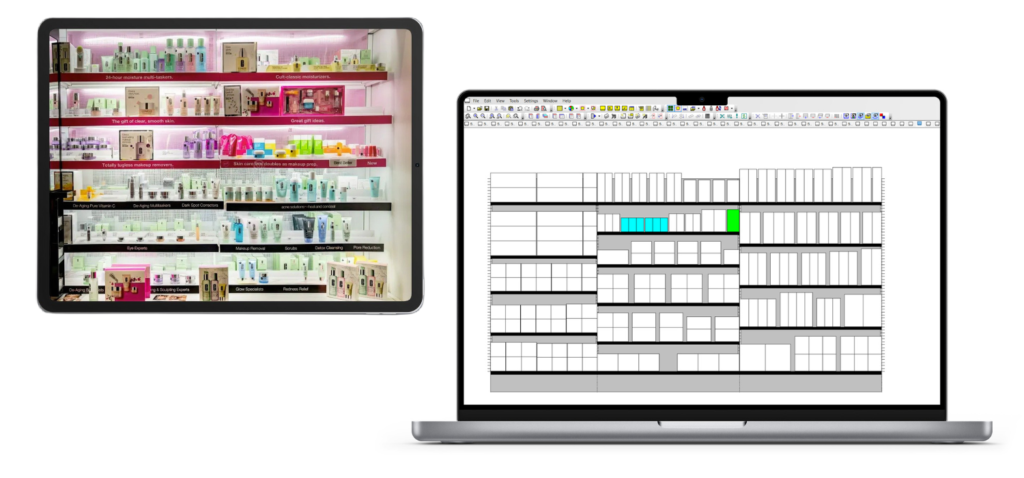
For most consumer goods manufacturers and retail teams, planograms are the backbone of merchandising strategy. They’re designed to drive sales, optimize shelf space, and deliver a consistent shopping experience. Yet so often, once these meticulously engineered blueprints leave the HQ and hit the store floor, the outcomes don’t match expectations.
Merchandising teams invest countless hours designing planograms that reflect category strategy, shopper behavior analytics, and predictive models. And then they get executed in hundreds — sometimes thousands — of stores with mixed results at best. Why does this happen? And more importantly, how can companies bridge the divide between strategy and execution?
In this post, we’ll unpack why most planograms fail in the real world and offer a framework for how to fix them.
The Root of the Problem: The Strategy–Execution Disconnect
At its core, the failure of most planograms isn’t about bad design. It’s about flawed assumptions — assumptions about stores, about employees, and about the environment in which the planogram must operate.
HQ teams typically design planograms based on:
- Historical POS data
- Shopper behavior studies
- Space elasticities
- Category management principles
But what these tools rarely capture is the real environment in which a planogram lives:
- Time pressures on store associates
- Operational priorities (e.g., stocking before planogram work)
- Variations in actual shelf conditions versus plan
- Differences in local assortments and promotions
This leads to a recurring pattern: a beautifully optimized planogram on paper, and a compromised layout on the shelf.
Why Planograms Fail in the Real World
Let’s examine the specific reasons most planograms don’t deliver:
A. The Store Realities Don’t Match the Assumptions
When HQ teams design a planogram, they usually work with an idealized view:
- Every shelf is perfectly dimensioned
- Products are evenly spaced and always available
- Stores have time to execute planogram changes as planned
But in reality:
- Shelves are damaged, mislabeled, or non-standard
- Some products are out of stock
- Store teams prioritize replenishment and customer service over perfect layouts
Result: The planogram is altered — intentionally or unintentionally — to make it workable, often at the cost of the intended strategy.
B. Lack of Contextual Visibility
Headquarters often lacks reliable, real-time visibility into what’s actually on the shelf. Even with periodic store audits, by the time discrepancies are flagged, the situation has changed. The result? HQ continues to send designs based on outdated or incomplete information.
C. Execution Workload in Stores Is Overwhelming
Store teams juggle:
- Receiving shipments
- Replenishing stock
- Customer service
- Pricing and labeling
- Seasonal resets
- Promotions
Adding planogram changes to this list often pushes them toward shortcuts like:
- Ignoring the planogram
- Approximating placement
- Deviating from assigned facings
Execution becomes optional rather than mission-critical.
D. Inadequate Training and Tools
Most store associates do not have formal training in planograms or category optimization. They receive PDFs or printed sheets that are:
- Hard to interpret
- Hard to execute without physical cues
- Quickly outdated when promotions or inventory changes happen
Without intuitive, easy-to-use tools, accurate execution becomes a constant struggle.
E. The Human Element: Judgment and Interpretation
Human error is inevitable. Even well-intentioned associates may interpret instructions differently — especially under pressure.
For example:
- “Place the product to the right” may mean something different to different people
- Associating a planogram symbol with the physical product location can be confusing
- New hires are unfamiliar with category logic and objectives
So what ends up on the shelf can vary widely from the original design.
The Shift: From Static Plans to Dynamic Execution
To bridge the gap between strategy and reality, modern retail leaders are beginning to rethink planograms not as static instructions, but as living, adaptable blueprints.
Here’s what this shift involves:
Fix #1 — Make Store Reality the Starting Point
If your planogram doesn’t reflect the actual shelf — with all its irregularities — it’s already obsolete before it’s executed.
Fix: Invest in accurate shelf capture and store profiling.
This can include:
- Shelf scans (barcode or image-based)
- Digital maps of actual dimensions
- Tagging irregular shelving or damaged fixtures
By modeling planograms on real shelf dimensions and conditions, you reduce the gap between design and execution. Stores don’t have to “guess” how to adapt a perfect design to imperfect space — because the design already matches the space.
Fix #2 — Give Execution Tools That Work in the Real World
A good planogram is only as effective as the tools used to execute it.
Instead of PDF printouts and spreadsheets, provide:
Visual, Mobile-Friendly Instructions
- Interactive shelf diagrams
- Photos of how adjacent categories are displayed
- Step-by-step guidance with visual cues
This reduces interpretation errors and saves time.
In-Task Alerts and Notifications
- Flag missing products before execution
- Alert when a fixture doesn’t match expected dimensions
- Suggest alternative placement when out of stock
Execution becomes proactive, not reactive.
Fix #3 — Close the Feedback Loop
Most planogram cycles are one-way: HQ sends a design, stores execute it, and then results come in weeks later via sales data.
Fix: Create a closed feedback loop — in real time.
This includes:
- Capturing shelf compliance data quickly
- Comparing execution versus design
- Feeding execution discrepancies back into the next design cycle
- Adjusting designs based on execution success, not assumptions
This turns each store into an active participant in shaping the next generation of planograms.
Fix #4 — Empower Associates With Training and Purpose
Store teams execute dozens of tasks every day. If planogram work feels like a low-priority add-on, it will continue to be treated that way.
Fix: Elevate planogram execution with better training and context.
This doesn’t mean hours of classroom time — it means:
- Bite-sized micro-learning modules
- In-app guidance tied to tasks
- Messages that explain why categories are designed as they are
Associates who understand the purpose and impact of accurate placement are more likely to care about getting it right.
Fix #5 — Treat Planograms as a Living System
Traditional planograms are static and updated on fixed cycles — perhaps quarterly or seasonally.
But real life changes fast:
- Promotions
- Out-of-stocks
- Inventory imbalances
- Category shifts
- Local preferences
Instead of static designs, treat planograms as dynamic models that adapt to:
- Store size
- Inventory levels
- Seasonal trends
- Real-time sales performance
This requires analytical tools that can ingest live data and suggest smart, targeted updates rather than full redesigns.
Fix #6 — Make Compliance Measurable and Actionable
Too often compliance is measured weeks after execution — long past the moment of error.
Instead, companies should:
Measure Fast
Use quick audits, photos, or scans to assess compliance:
- Daily for high-impact categories
- Weekly for rotating assortments
- Monthly for staples
Action-Trigger Alerts
If compliance falls below a threshold:
- Alert store teams immediately
- Provide specific instructions to fix
- Track resolution
This turns compliance from a lagging KPI into an action driver.
Fix #7 — Customize, Don’t Standardize Blindly
Many planogram failures stem from a one-size-fits-all mentality.
But stores are different:
- Demographics
- Traffic patterns
- Inventory levels
- Physical space
- Local shopper preferences
Your planograms should adapt to store clusters, not force all stores to fit the same mold.
This means:
- Clustering stores by format and performance
- Designing variants for top clusters
- Applying machine learning to recommend cluster-level changes
The result? A strategy that feels tailored, not generic.
A New Mental Model: Treat Planograms Like Software
Here’s a powerful analogy: planograms should be treated like software, not print manuals.
Why?
- They have versions
- They need updates
- They evolve based on user behavior
- They need robust testing before rollout
- They require error monitoring
Just as good software development has:
- Continuous integration
- Automated testing
- Real-time monitoring
Modern merchandising should have:
- Continuous shelf feedback
- Adaptive designs
- Execution performance tracking
- A/B testing of designs
This mindset flips planograms from static deliverables into living systems that improve over time.
The Business Impact of Better Execution
When you fix planogram execution issues, the business impact compounds:
Higher Sales
Because products are:
- Placed where shoppers expect them
- Displayed with optimal adjacencies
- Replenished accurately
Better Inventory Turn
Accurate placement reduces:
- Overstocks
- Stockouts
- Needless transfers
Improved Shopper Experience
Consistency builds trust:
- Shoppers find what they want
- Stores feel organized
- Customers return
Higher Store Team Satisfaction
When teams have better tools and clearer guidance:
- Errors decrease
- Confidence rises
- Execution becomes rewarding, not burdensome
Final Thoughts: Start With Execution, Not Design
The irony of many planogram failures is this:
Companies obsess over perfect designs — but never solve the real problems of execution. And execution is where the value actually happens.
If your next planogram rollout spends more time:
- Understanding store realities
- Providing execution tools
- Capturing real-time feedback
- Adapting designs dynamically
…than obsessing over perfect space optimization models, you’ll end up with something far more powerful:
A planogram that actually works in the real world.
And that’s the difference between a plan that looks good on paper and one that delivers results where it matters — on the shelves, in front of the customer, and on the P&L.
